Key features
Synchronize data automatically or on demand:
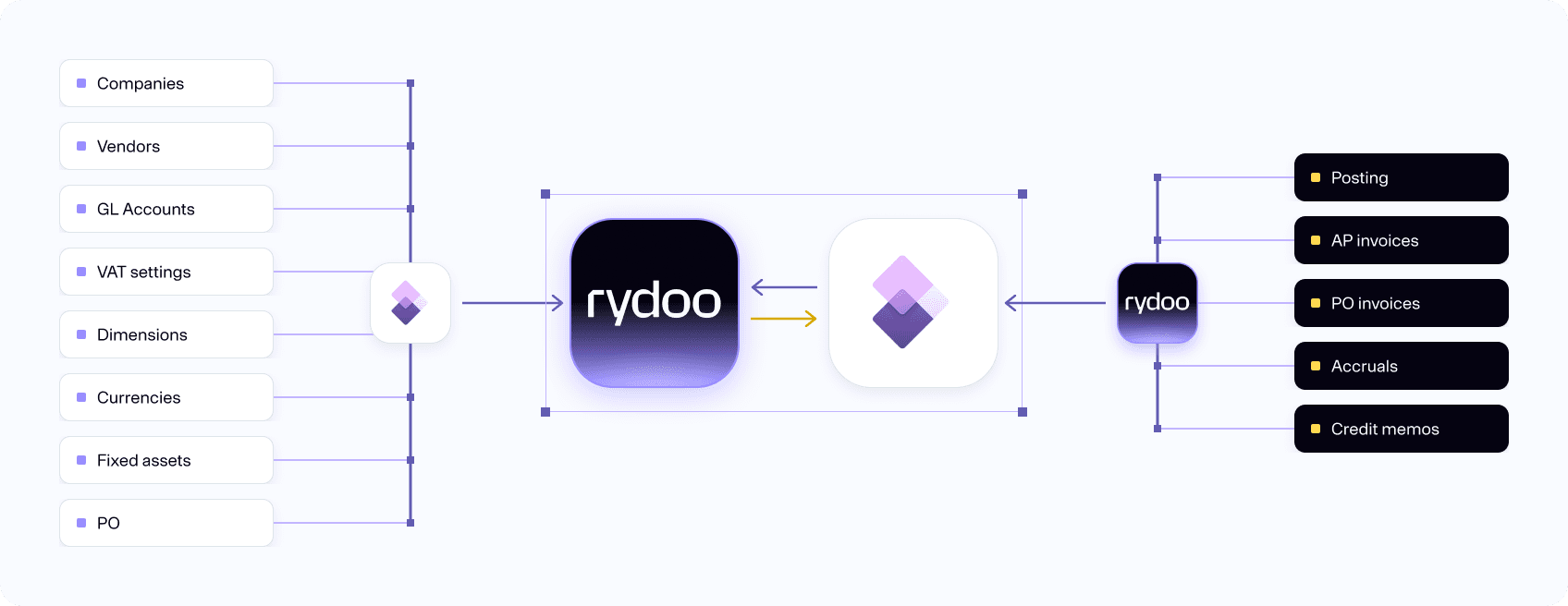
- Decide for yourself the frequency of the automatic data synchronization, or manually push data on demand.
Import POs from Microsoft into Rydoo Accounts Payable:
- Purchase Orders, as well as Goods Received Notes, are automatically sent from Microsoft Dynamics 365 F&O to Rydoo Accounts Payable.
3-way support for matching of purchase orders:
- When PO invoices are posted to the ERP, relevant PO statuses are sent back to Rydoo accounts Payable.
How it works
Our Microsoft Dynamics 365 Finance & Operations connector lets you work even more seamlessly with Rydoo Accounts Payable. It syncs master data from Microsoft Dynamics 365 F&O through both scheduled and triggered jobs, so all accounts, dimensions, suppliers and other accounting parameters you need are always available and up to date in real time.
Plug and play
As a Microsoft Partner, we’re committed to making sure that you have a frictionless user experience, which is why we have a dedicated plug-in for Dynamics 365 Finance & Operations. It works out of the box and comes with advanced error handling to help ensure high-quality syncing. All you need to do is connect the two systems – no custom development necessary.
The integration between Rydoo Accounts Payable and Microsoft Dynamics 365 Finance & Operations ensures that all relevant data is synchronized between the systems, providing full traceability of vouchers and eliminating the need for further processing of incoming invoices in the ERP.
FAQs
The sync intervals can be configured by yourself or your system integrator when you do the setup in our self-service centre.
You have complete control from Rydoo Accounts Payable over all your invoices, as the current posting statuses in the ERP are reflected there.
Rydoo Accounts Payable synchronises the account structure set up in Microsoft Dynamics 365 Finance & Operations, so you’ll get the same validations in Rydoo Accounts Payable as in the ERP.