
Key features
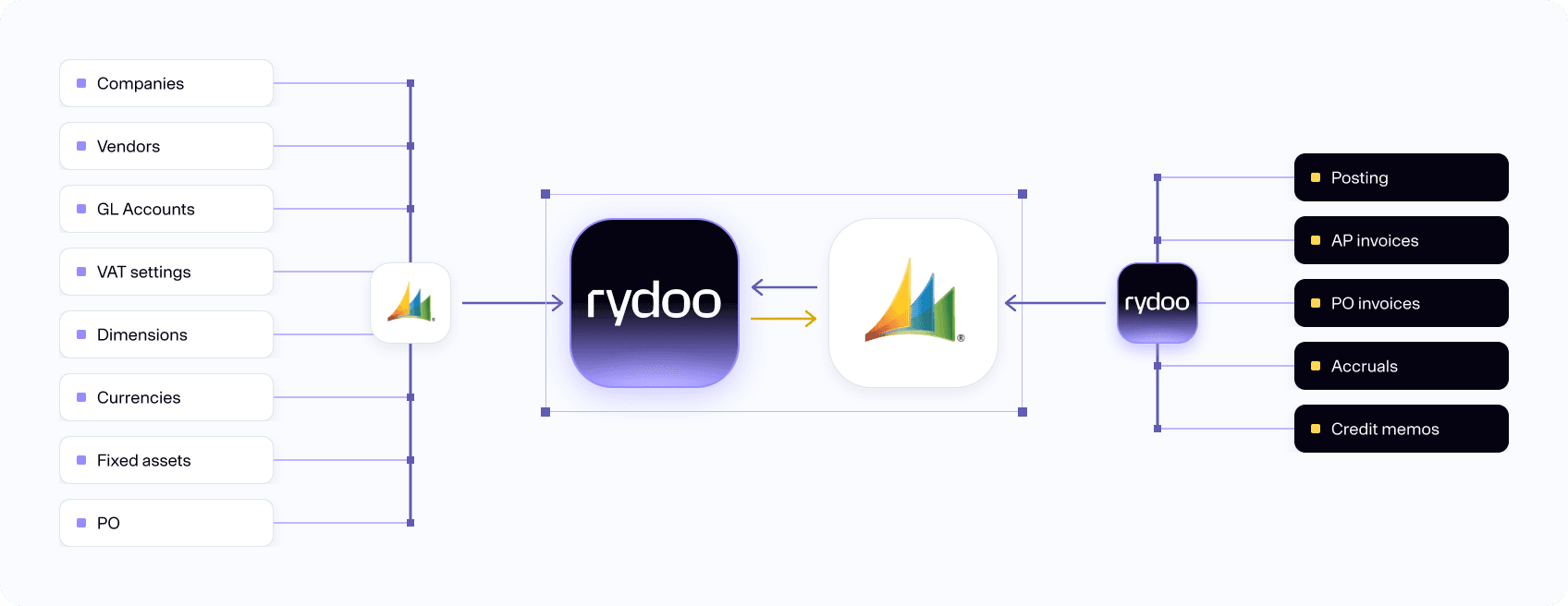
Automatically sync of master data like vendors, accounts, dimensions and VAT codes:
- Synchronisation either with fixed frequencies or through manual data synchronisation.
Purchase orders:
- 3-way matching with receipts from ERP.
Accruals:
- Rydoo Accounts Payable suggests accruals when an accounting period is captured on the invoice and sends a pre-accrued voucher to the ERP.
Fixed assets:
- Other accounts types than general ledger can be freely used in Rydoo Accounts Payable, including fizes assets, supplier, and customer.
Payment terms:
- The voucher can be easily traced back from ERP to Rydoo Accounts Payable with a link and voucher number. Rydoo Accounts Payable has a full logging of activities on the voucher.
How it works
Our Microsoft Navision integration connects seamlessly with Rydoo Accounts Payable. All accounts, VAT codes, dimensions and vendors sync from the ERP, including any relationships between these parameters.
Plug and play
Rydoo Accounts Payable is built with modern user interface principles in mind, using Rydoo Accounts Payable to automate the accounts payable process will give your users a modern and more effective tool than what is being used today. Using machine learning and AI, the error rate in the accounting process will drastically decrease.
With Rydoo Accounts Payable integrated with Microsoft Navision, you can easily process invoices across all accounting clients, have full control, and experience a reduction in the amount of repetitive, manual accounting work for each invoice that Rydoo Accounts Payable has already processed.
FAQs
Automatic synchronisation of all master data gives you a seamless experience as newly created values in Xledger will be available in Rydoo Accounts Payable automatically.
Rydoo Accounts Payable synchronizes status on all master data, so once a project is set to closed or inactive it will no longer be possible to choose that project in Rydoo Accounts Payable
Rydoo Accounts Payable synchronizes a purchase order as soon as it is created, but the status of the PO will determine when it is possible to match the invoice lines. By synchronizing the PO right away, Rydoo Accounts Payable is able to link an invoice to a PO before it is received, and then automatically trigger invoice line matching once the status of the PO is changed to “received”.
Manual vouchers are supported in Rydoo Accounts Payable, and you may process them either with or without approval. Manual vouchers can be uploaded directly in Rydoo Accounts Payable, and can be coded as desired. Once posted they will be booked on a separate voucher number series than invoices and credit invoices.