
Key features
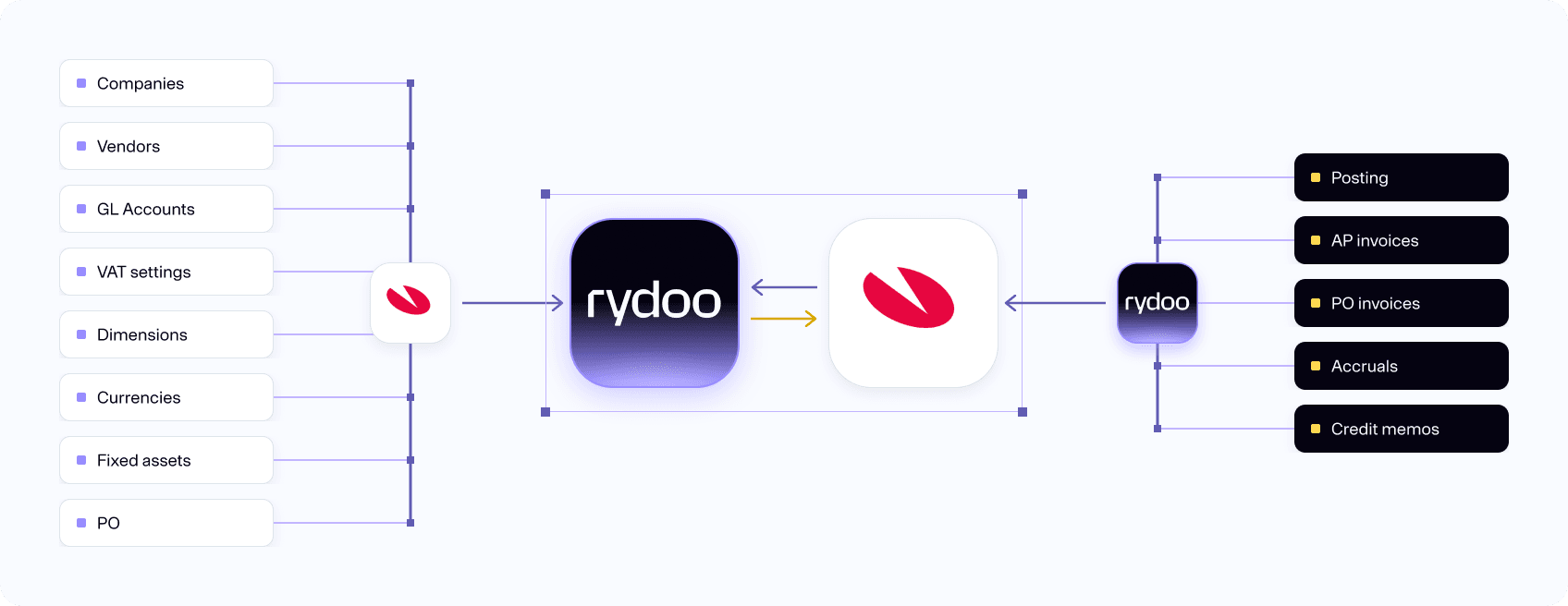
Automatically sync of master data (vendors, accounts, dimensions, VAT codes):
- Your master data is transferred from Visma Business and is used for matching of incoming invoices and suggestions for the accounting parameters, ensuring the validity of the parameters.
Vendor matching and duplicate check:
- All relevant supplier information is synchronised from Visma Business to Rydoo Accounts Payable where they are applied to incoming invoices automatically. If a supplier happens to send two identical invoices by mistake, this is detected and marked as a duplicate.
Full automation of accounts payable process:
- Learning from your methods of accounting, Rydoo Accounts Payable will automatically apply accounting parameters on incoming invoices the next time, so you don’t have to!
Invoices will be automatically posted to VIsma Business upon approval:
- When all approval steps are done, and the invoice accounting parameters are verified OK the invoice will automatically be sent to Visma Business and ready for payment. How many steps of approval and control along the way you want is entirely up to you.
Support for 3-way purchase order matching:
- Rydoo Accounts Payable will get information on newly created or updated purchase orders from Visma Business and keep this synchronized until the orders are completed. The process from ordering to goods receipt to payment is kept updated until the order has been closed in Visma Business.
Automatic sync of purchase orders based on status from Visma Business:
- On update of goods receipt note in Visma Business any invoices matched with the PO in Rydoo Accounts Payable will be updated and matched with goods available on each line. When Rydoo Accounts Payable gets a notice that everything has been received and paid the order will be closed in Rydoo Accounts Payable.
Code multi-currency invoices:
- All invoice lines are analyzed on the way into Rydoo Accounts Payable and presented individually, so that prices and currency can be handled separately where necessary.
How it works
Rydoo Accounts Payable integrates seamlessly with Visma Business to fully automate your invoice process. Master data from Visma Business syncs automatically, so you can handle every invoice from intake to posting, all within Rydoo Accounts Payable.
Stable and flexible
Visma Business is our most deployed and used integration, and every day it ensures that thousands of accounting parameters and invoices are kept synchronised with Rydoo Accounts Payable. The integration runs locally on your Visma Business application server and imports data through VBS so that invoices can simply be paid upon completion. Since it is your data that is being used for the accounting process you can be sure that Visma Business will accept the values being used in Rydoo Accounts Payable.
We have a standard, pre-packaged installation set which is configured locally in your environment, specifically for your set-up and needs. This makes it quick and easy for us to start the synchronisation of master data and for you to get started with the approvals. The flexibility in the solution makes it possible for us to accommodate special requirements you have in your day-to-day business.
Accessible where you are
As a cloud-based platform hosted in Microsoft Azure, Rydoo Accounts Payable is as good as always available from both your browser and our mobile application. The infrastructure Rydoo Accounts Payable is built on is scalable and stabile and gives us the opportunity to implement new features without any downtime. Our mobile application gives you the opportunity to approve invoices on the go so that they can be posted in Visma Business, no matter where you are in the world.
The integration acts as a connection between your local installation of Visma Business and Rydoo Accounts Payable’s API, which is publicly available in the cloud. In this way we can pass master data and invoices back and forth between Rydoo Accounts Payable and your Visma Business solution continuously throughout the day.
FAQs
Continuous synchronization of all master data gives you a seamless experience as newly created values in Visma Business will be available in Rydoo Accounts Payable automatically.
Rydoo Accounts Payable synchronizes status on all master data, so once a project is set to closed or inactive it will no longer be possible to chose that project in Rydoo Accounts Payable
Rydoo Accounts Payable synchronizes a purchase order as soon as it is created, but the status of the PO will determine when it is possible to match the invoice lines. By synchronizing the PO right away Rydoo Accounts Payable is able to link an invoice to a PO before it is received, and then automatically trigger invoice line matching once the status of the PO is changed to “received”
Manual vouchers are supported in Rydoo Accounts Payable, and you may process them either with or without approval. Manual vouchers can be uploaded directly in Rydoo Accounts Payable, and can be coded as desired. Once posted they will be booked on a separate voucher number series than invoices and credit memos.