
Key features
- Easy synchronization of data with Rydoo Connect
- Set Up in few easy steps
- Choose approval workflow in Uni Economy or Rydoo
How it works
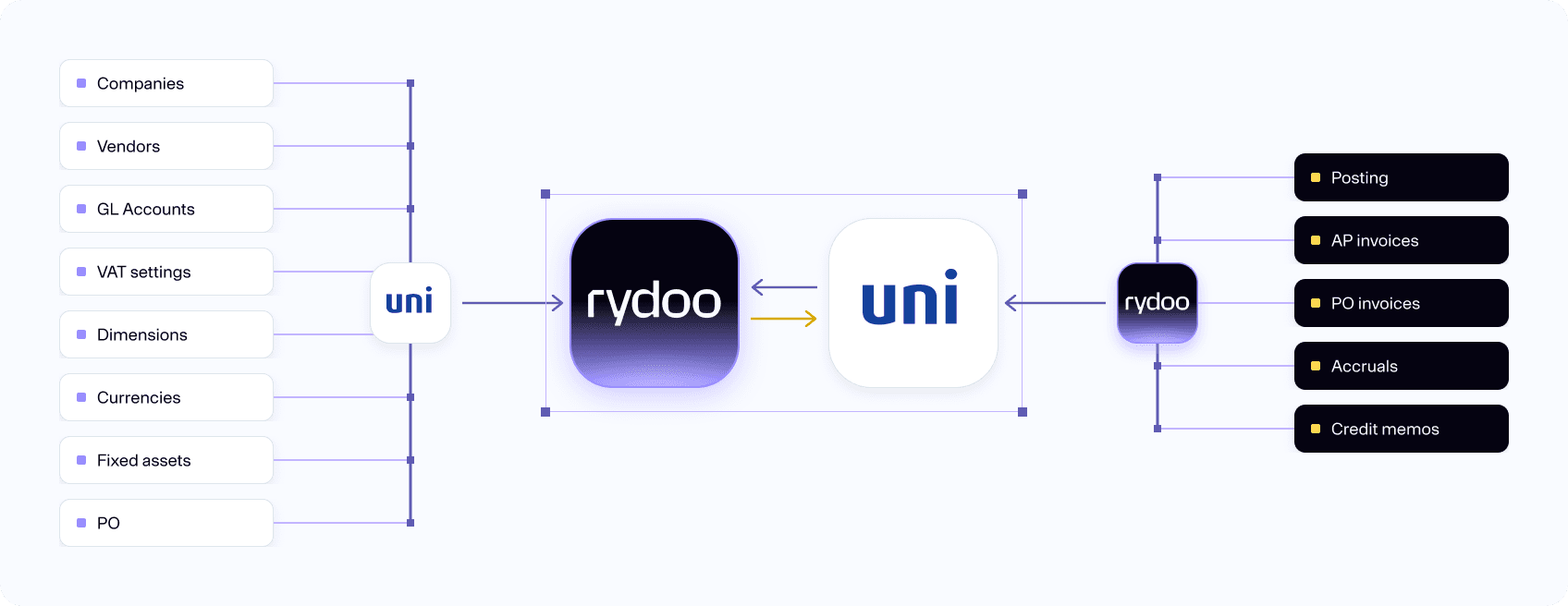
Our web-based integration interface, built into Rydoo Accounts Payable, makes connecting to Uni Economy simple. All accounts, dimensions, suppliers and other accounting parameters sync from Uni Economy, so they're always available and up to date in Rydoo Accounts Payable. You can keep handling approvals in Uni Economy as before, or switch to the flexible approval workflows in Rydoo Accounts Payable.
Plug and play
Based on the Rydoo Accounts Payable Connect integration engine, the connection to Uni Economy is easy to set up and works out of the box. It comes with multiple options for synchronizing data. Including ability to choose if invoices should be booked directly to the general journal in Uni Economy or stop for control in the invoice inbox.
Expand the possibilities with Uni Economy by connecting with Rydoo Accounts Payable. By connecting Rydoo Accounts Payable and Uni Economy, possibilities open to working more efficiently with larger volume of invoices. Work with multi-client views in Rydoo Accounts Payable, and post directly to the correct entities general journal in Uni Economy.
FAQs
Not necessarily. Your customers can approve invoice in Uni Economy, while Rydoo Accounts Payable helps you with invoice automation. You can always switch to having approval in Rydoo Accounts Payable instead of Uni Economy. It is your choice!
Of course.
You need the system id. You will find this by clicking the question mark in the upper right corner.